
The USB-C of AI: How the Model Context Protocol (MCP) Changed Everything
"In 2024, we built brilliant AI 'brains' but gave them no hands. In 2026, the Model Context Protocol (MCP) finally plugged them into the world."
I remember buying a brand-new smartphone and thinking it was crazy that I had to get a different charging cable for every room in my house. Don't even get me started on the one for my car. It just didn't make sense.
Artificial Intelligence used to work in a similar way. If a company built an AI assistant and wanted it to access their internal data, search a specific database, or check the weather, developers had to write a lot of custom code. This code was messy. It only worked for that one AI and that one tool. If the company decided to switch to a different AI model, they had to start from scratch and rewrite everything. It was really frustrating and time-consuming.
The Model Context Protocol, or MCP, has changed all of that. It is making Artificial Intelligence more accessible and user-friendly. The MCP is like a universal charging cable or USB-C for AI. Artificial Intelligence models can now easily connect to different tools and databases. Companies can now switch between AI models without having to rewrite code. The Model Context Protocol is revolutionizing the way we use Artificial Intelligence, making it more efficient, adaptable, and truly plug-and-play.
How Does It Actually Work?
MCP breaks the system down into three simple roles. Imagine it like a restaurant:
- The Host (The Customer): This is where you talk to the AI (like your coding app or your enterprise assistant). It’s the brain that needs answers.
- The Client (The Waiter): This sits inside the app. It takes the AI's requests, translates them safely, and passes them along to the kitchen.
- The Server (The Kitchen): This is a small, separate application connected to the actual data like your local files, a secure database, or Google Maps. It prepares the exact information the AI asked for and sends it back.
Because everyone is speaking the same "MCP language," the AI doesn't need to know the complex inner workings of the kitchen. It just places an order, and MCP delivers the data on a silver platter.
Visualizing the Flow: The Architectural Framework
To see how this works in a professional setting, we can look at the Complete Flow Architecture. This diagram shows how a user's simple request travels through the AI "Brain" and the MCP "Bridge" to reach a complex backend system like Figma.
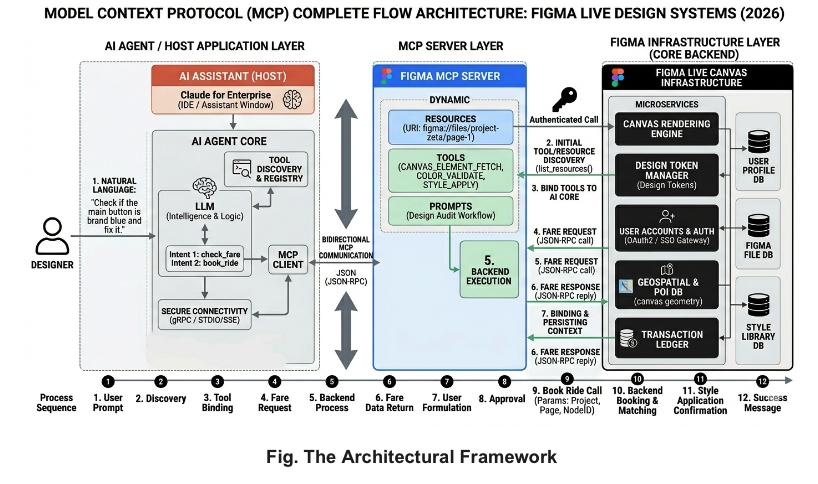
Fig. The Architectural Framework
The Three Layers of MCP
- AI Agent Layer: The LLM interprets what you want and identifies which "tool" it needs to use.
- MCP Server Layer: The bridge that holds the "Tools" (actions) and "Resources" (data). It translates the AI's wish into a technical command.
- Infrastructure Layer: The final destination—this is where your actual files, maps, or databases live.
Why Is This a Game-Changer?
- No More Copy-Pasting: Before MCP, if you wanted an AI to analyze a spreadsheet or fix a bug, you usually had to manually copy and paste chunks of text. With MCP, you can just say, "Look at my budget spreadsheet and tell me where we are overspending." The AI safely accesses the file directly.
- Massive Time Savings: By automating how AI talks to software, tasks that used to take human developers hours of manual clicking now happen in seconds. Teams have reported cutting down task times by 80% to 90%.
- Lower Costs and Cleaner Brains: AI models have a limit on how much they can remember at once (the "context window"). MCP keeps things light. The AI only asks for the specific tool or data snippet it needs right at that moment.
- Safety and Control: MCP acts like a strict security guard. It defines exactly what the AI can see (Resources) and exactly what it is allowed to do (Tools), leaving a digital paper trail for humans to audit.
Real-World Examples: MCP in Action
- Creative Design (Figma): A designer asks if a layout follows the brand guide. The AI uses the Figma MCP Server to "read" the canvas and automatically updates colors to match the design system.
- E-Commerce (Shopify): A store owner tells the AI to restock top-selling items. The AI checks live inventory via MCP and automatically drafts order emails when stock is low.
- Digital Marketing: A manager asks which ad is performing best. The AI connects to Google, Meta, and HubSpot servers simultaneously, compares live data, and reallocates budget instantly.
Looking Ahead
As AI agents become more autonomous in 2026, MCP is the foundational layer of the global "Agentic Web." It has turned isolated chatbots into collaborative team members that can securely interact with the digital tools we use every single day. The walls are down, and the AI is officially plugged in.